At last! Mount SSH in the Finder! #
I've been looking for a way to mount SSH or SFTP in OS X's Finder for several weeks. Sure, you can tunnel AFP over SSH if you are connecting to a server that offers AFP (mine doesn't). OS X's "Connect to Server..." feature does not support SFTP or SSH, and SFTPDrive for OS X has not been released. Now, thanks to Amit Singh and Google (and of course the original FUSE team), MacFUSE has made it possible! Of course, it can do a whole lot more than just SSHFS (read/write NTFS, UnionFS support, etc), but being able to securely mount a remote Linux server in the Finder is awesome.
Thomas Stromberg has a good overview of using MacFUSE and SSHFS, but I needed to make a few changes before it worked for me:
- Download the binary: fuse-binaries-0.1.0b006.tar.bz2
- Install: $ sudo tar -C / -jxvpf fuse-binaries-0.1.0b006.tar.bz2
- Attempting to run sshfs returned the error "fuse: failed to exec mount program: No such file or directory", since /usr/local/bin is not in Tiger's default PATH. To remedy this:
$ export PATH=/usr/local/bin:$PATH
Alternatively, you could include it in /etc/profile
- Run: $ sshfs username@host:/some/remote/directory /some/local/mount/point -o ping_diskarb,volname=some_volume_name,reconnect
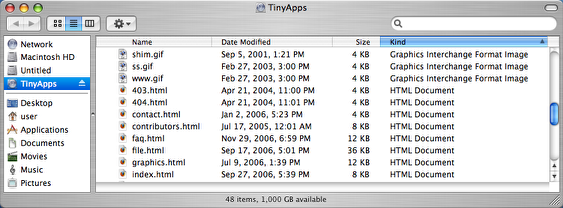
That's it! The remote server is now accessible via the Finder:
/mac | Jan 14, 2007
RSS | Archives