Editing ISO images #
Converting a retail Windows XP ISO image to an OEM version was made even simpler thanks to ISO Master (free for Linux, $20 for Windows). These steps were performed in Ubuntu 9.04:
- Download and install ISO Master via Synaptic Package Manager (search for "isomaster" without the quotes.)
- Launch ISO Master from Sound & Video in the Main Menu.
- Tools > Options > replace "mousepad" with "gedit" (again, without quotes)
- File > Open > select desired ISO image (in this example, we'll use the Windows XP ISO mentioned above)
- Let's edit SETUPP.INI: In the bottom pane, double click the I386 folder, right click SETUPP.INI, and click Edit
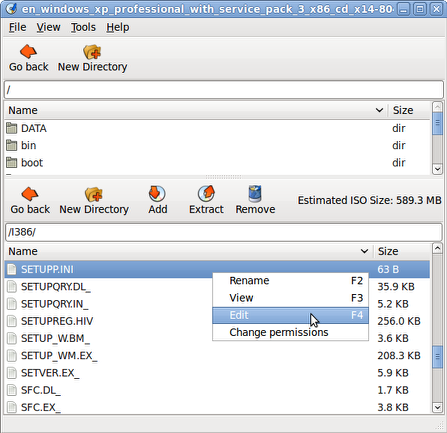
- gedit will open SETUPP.INI. Make desired changes.
- In gedit, click File > Save > and then close gedit
- In ISO Master, click File > Save As > type a new filename (it will not allow you to overwrite the original ISO image) and click Save.
UPDATE: Had trouble adding a file to an existing ISO image with ISO Master, but UltraISO did the trick.
/nix | Jun 19, 2009
Subscribe or visit the archives.