Resolving "SG_IO: bad/missing sense data" after running ATA SE on a WD My Passport USB HDD
USB storage bridges may expose ATA commands via SCSI/ATA Translation (SAT), but ATA Security behavior varies by bridge and firmware. Without an explicit vendor guarantee, reported capabilities alone do not confirm that a command can pass through the bridge and execute successfully on the drive.
To avoid orphaning data on the platters in the event of lockout, a 1 TB WD My Passport USB HDD was zeroed with dd then queried for ATA Security support:
hdparm -I /dev/sdX

/dev/sdX:

ATA device, with non-removable media
    Model Number:       WDC WD10JMVW-11AJGS1
...
Security:
    Master password revision code = 48059
        supported
    not enabled
    not locked
    not frozen
    not expired: security count
        supported: enhanced erase
    332min for SECURITY ERASE UNIT. 2min for ENHANCED SECURITY ERASE UNIT.
...
Setting a password appeared to work:
hdparm --user-master u --security-set-pass p /dev/sdX
security_password: "p"

/dev/sdX:
 Issuing SECURITY_SET_PASS command, password="p", user=user, mode=high
but issuing SECURITY ERASE failed:
hdparm --user-master u --security-erase p /dev/sdX
security_password: "p"

/dev/sdX:
 Issuing SECURITY_ERASE command, password="p", user=user
SG_IO: bad/missing sense data, sb[]:  70 00 05 00 00 00 00 0a 00 00 00 00 24 00 00 00 00 00 00 00 00 00 00 00 00 00 00 00 00 00 00 00
SG_IO: bad/missing sense data, sb[]:  70 00 05 00 00 00 00 0a 00 00 00 00 24 00 00 00 00 00 00 00 00 00 00 00 00 00 00 00 00 00 00 00
Decoded SCSI sense data:
sg_decode_sense 70 00 05 00 00 00 00 0a 00 00 00 00 24 00 00 00 00 00 00 00 00 00 00 00 00 00 00 00 00 00 00 00
Fixed format, current; Sense key: Illegal Request
Additional sense: Invalid field in cdb
In other words, something in the storage path reported that the SCSI command descriptor block (cdb) used to carry the ATA request contained an invalid or unsupported field.
hdparm -I /dev/sdX initially continued to return the correct device information. However, after disconnecting and reconnecting the drive, it reported only:
/dev/sdX:

ATA device, with non-removable media
Standards:
    Likely used: 1
Configuration:
    Logical     max current
    cylinders   0   0
    heads       0   0
    sectors/track   0   0
    --
    Logical/Physical Sector size:           512 bytes
    device size with M = 1024*1024:           0 MBytes
    device size with M = 1000*1000:           0 MBytes
    cache/buffer size  = unknown
Capabilities:
    IORDY not likely
    Cannot perform double-word IO
    R/W multiple sector transfer: not supported
    DMA: not supported
    PIO: pio0
Attempting to unlock also failed:
hdparm --user-master u --security-unlock p /dev/sdX
security_password: "p"

/dev/sdX:
 Issuing SECURITY_UNLOCK command, password="p", user=user
SG_IO: bad/missing sense data, sb[]:  70 00 05 00 00 00 00 0a 00 00 00 00 24 00 00 00 00 00 00 00 00 00 00 00 00 00 00 00 00 00 00 00
WD Drive Utilities restored access to the drive:
Launch WD Drive Utilities; the Unlock Drive prompt will appear:
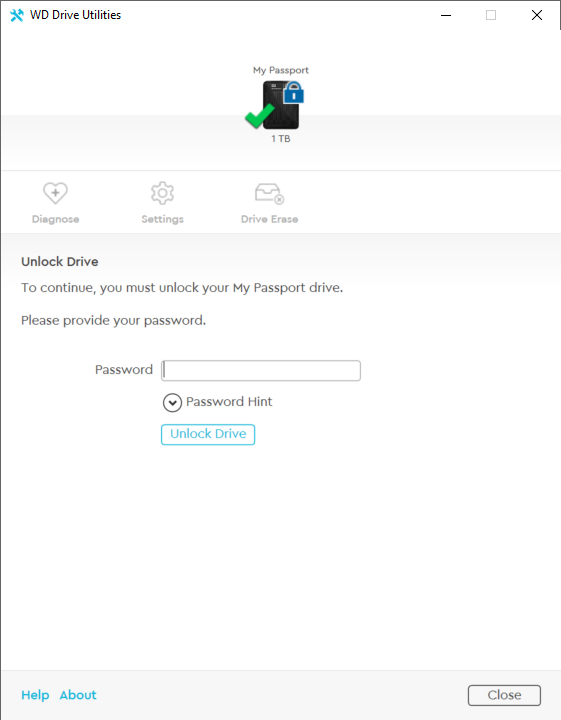
The password set with
hdparmwill not be accepted; enter any password five times to reveal an erase option (the Drive Erase icon remains unavailable while the drive is locked):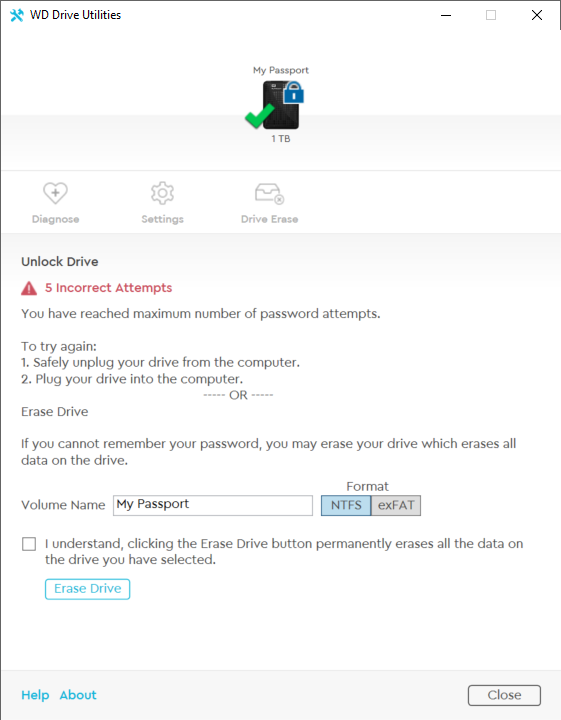
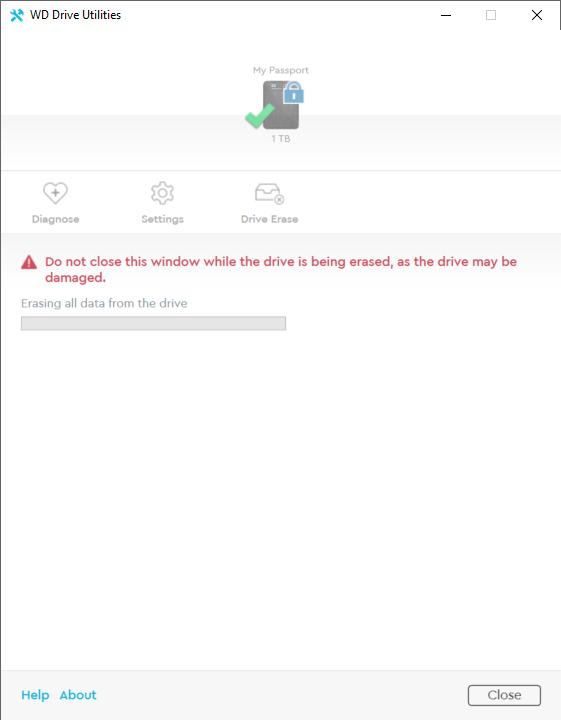
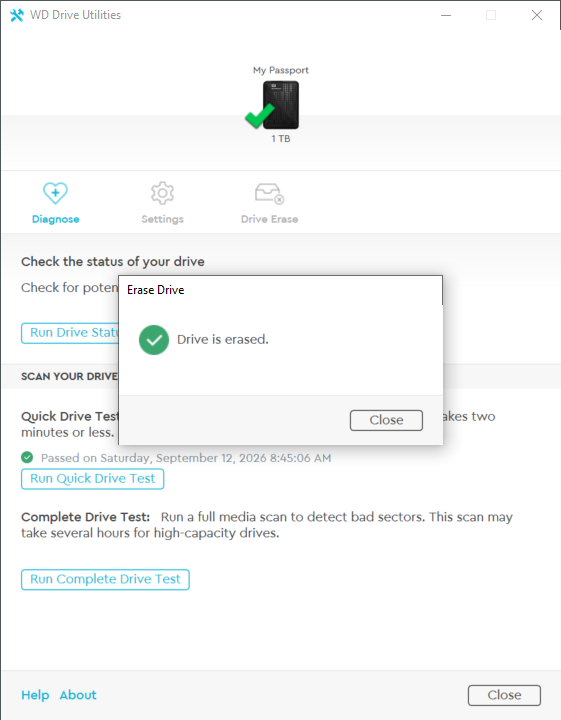
Set volume name and format, acknowledge the warning, and click Erase Drive. The utility erases and reinitializes the drive, restoring access:
Updates
Restore access to the drive without leaving Linux by using the erase function in 0-duke's WD My Passport Drive Hardware Encryption Utility for Linux:
wdpassport-utils.py --device /dev/sdXDevice: /dev/sdX Security status: Locked Encryption type: Full Disk EncryptionAttempting to unlock the drive using the password set with
hdparmfails, just as it does in WD's own utility:wdpassport-utils.py --device /dev/sdX --unlock[wdpassport] password for /dev/sdX: [!] Key hash parameters are not valid.Erasing the drive, however, restores access:
wdpassport-utils.py --device /dev/sdX --erase[+] All data on /dev/sdX will be lost. Are you sure you want to continue? [y/N] y [*] Device erased. You need to create a new partition on the device (Hint: fdisk and mkfs)hdparm -I /dev/sdX/dev/sdX: ATA device, with non-removable media Model Number: WDC WD10JMVW-11AJGS1 ... device size with M = 1000*1000: 1000171 MBytes (1000 GB) cache/buffer size = 8192 KBytes Nominal Media Rotation Rate: 5400 ...Inspired by tigerblue77's AI-generated, zero-dependency unlock and eject scripts (themselves inspired by Kenny MacDermid's wdpassport-utils), I asked Astra to build a similar script for erasing WD My Passport drives. It produced
erase_wd_passport.pyin one shot, using only the Python 3 standard library: no pip packages, sg3-utils, hdparm, pyudev, or compiled extensions required. Tested on the 1TB drive mentioned above; your mileage may vary. All existing data will be lost, and the drive itself may be rendered unusable. Proceed at your own risk (and joy).Usage
Without
--erase, the script only queries WD encryption status:python3 erase_wd_passport.py /dev/sdXDevice: /dev/sdX USB product: My Passport 07A8 USB serial: XXXXXXXXXXXXXXXXXXXXXXXX Security: Locked (0x01) Cipher: 0x30; key length: 32 bytesTo erase, unmount any mounted filesystems on the disk, then run:
python3 erase_wd_passport.py /dev/sdX --eraseDevice: /dev/sdX USB product: My Passport 07A8 USB serial: XXXXXXXXXXXXXXXXXXXXXXXX Security: Locked (0x01) Cipher: 0x30; key length: 32 bytes ALL data on this disk will become inaccessible. Keep it connected. Type 'ERASE /dev/sdX' to continue:ERASE /dev/sdXSending WD key reset... WD key-reset command completed successfully. After reset: No lock (0x00) Reported capacity: 1,000,170,586,112 bytes First sector is readable. Create a new partition table and filesystem before use.What it does
The script implements the WD encryption-key reset from 0-duke/wdpassport-utils using standard-library
ctypesandfcntl.ioctl. Before resetting, it verifies the whole-disk path and WD My Passport USB identity, checks for mounts, swap, and block-device holders, opens the device exclusively, and requires explicit confirmation. It then queries the drive's encryption status and current reset token and sends WD's vendor-specific key-reset command (C1 E3), intended to replace the internal data-encryption key and make existing data inaccessible. The request includes random bytes, following upstream's implementation, but whether the firmware uses them is unverified. Afterward, the script checks security status, capacity, and first-sector readability, then requests a partition rescan. These checks confirm basic access, not secure sanitization: the operation does not overwrite user-data sectors, create a filesystem, or perform ATA SECURITY ERASE. Firmware support varies, and this is not a general fix for "SG_IO: bad/missing sense data" errors.
Related
unable to dd, smartmon, fdisk or anything on a working external Western Digital Hard Drive
What USB to IDE adapter that can send the ATA Secure Erase command?
❧ 2026-09-12