Automatically play daily MP3s on an iPad every morning
Given a folder containing 365 MP3s in the Files app with names like:
2001-04-30...mp3
play the one matching today's month/day (ignoring the year) each morning at 9:00.
Create the shortcut
- Open the Shortcuts app
- Tap + in the top-right corner
- Tap the name field at the top (it says New Shortcut)
- Tap Rename
- Enter "Daily MP3"
- Tap the blue Return key
Action 1: Current Date
- Tap Search Actions
- Search for and tap Date
- Leave it set to
Current Date
Action 2: Format Date
- Tap Search Actions
- Search for and tap Format Date
- Leave the input set to
Date - Tap the dropdown arrow to the right of
Date - Tap
Shortto the right of Date Format - Tap
Custom - Change Format String to
-MM-dd - Tap the blue Return key
Action 3: Get Contents of Folder
- Tap Search Actions
- Search for and tap Get Contents of Folder
- To the right of Get contents of, tap
Formatted Date→Clear Variable→Folder - Browse to and select your MP3 directory
Action 4: Filter Files
- Tap Search Actions
- Search for and tap Filter Files
- Tap Add Filter
- Change
File SizetoName - Change
istocontains - Change
anythingtoFormatted Date - Tap the blue Return key
Action 5: Set Volume
- Tap Search Actions
- Search for and tap Set Volume
- Tap
50%and change to desired playback volume
Action 6: Play Sound
- Tap Search Actions
- Search for and tap Play Sound
- Tap the dropdown arrow to the right of
Play sound - Tap
Choose Variable - Select
Files(which is the output of theFilter Filesaction; Shortcuts labels it by output type, not by action name)
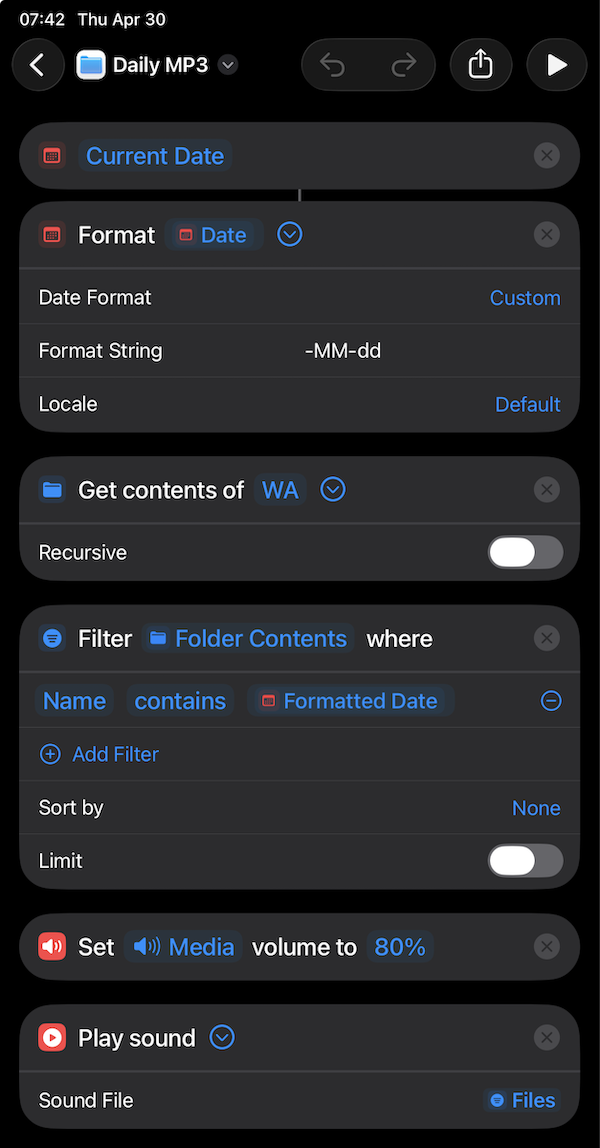
The shortcut should now look like this. Happily, the Play Sound action works even when the device is locked (perhaps the Apple dev who generously and sagaciously decided that can fix another issue).
Create the 9 AM automation
- Tap the back arrow at the top left
- Tap the Sidebar button at the top left if the sidebar is hidden
- Tap Automation
- Tap + in the top-right corner
- Tap Time of Day
- Set the time to
9:00 AM - Make sure Repeat is set to Daily
- Change Run After Confirmation to Run Immediately
- Tap Next
- Under My Shortcuts, tap Daily MP3
❧ 2026-04-30