Run Splash on M1 & M2 Macs
Splash is making waves in LLM inference on Apple silicon:
"It delivers 2× the decode speed of the next-fastest engine we measured on Qwen3.8-27B and stays ahead at every context length we tested, to 32K tokens. At four parallel subagents, the speedup increases to almost 4×."
The official release requires M3 or newer, but Erik Paperniuk has backported Splash for M1 and M2 Macs:
Steps
Install:
curl -fsSL https://github.com/paperniuk/splash/releases/download/1.0.2-m1/install-m1.sh | shServe:
splash-m1 serve --model incoai/Qwen3.8-27B-Splash(First run downloads the 17.4GB model package and prepares it for the GPU; later starts are much faster.)Chat at http://127.0.0.1:8000. To disable the chat page, add
--no-webuito the command in step 2. More settings.Set
http://127.0.0.1:8000as the OpenAI-compatible API base URL in apps like Goose. No key is needed unless you set one. Several coding agents are supported too, e.g.,splash-m1 opencode.
Update
Shortly after posting, stumbled onto this tweet from @ashxhart earlier today:
M1-4 silicone, I got you🫡
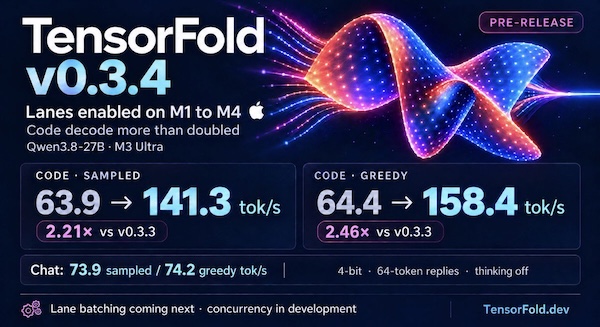
TensorFold v0.3.4 is up! Enabling lanes on M1–M4 more than doubled Qwen3.8-27B code decode on M3 Ultra to 141–158 tok/s.
Lane batching is coming next, with concurrency already showing early gains.
Follow the progress at tensorfold.dev.
Installed TensorFold 0.3.4 on a 2021 MacBook Pro (M1 Pro, 32 GB) via uv tool install git+https://github.com/ashhart/TensorFold.git and ran it with TF_ROW_MATMUL=row_qmv tensorfold serve Vontra/Qwen3.8-27B-MLX-4bit. The TF_ROW_MATMUL=row_qmv setting switches to an older fallback path, because the new v0.3.4 kernel for M1-M4 Macs crashes at load on M1 and M2 models.
Benchmarked both projects with a script crafted by Opus 5.5 in Claude Code:
Results
Splash-M1 ran Qwen3.8-27B chat about 1.3-1.5x faster than TensorFold, though that may change once the M1/M2 bug is fixed:
Splash-M1
incoai/Qwen3.8-27B-Splash at http://127.0.0.1:8000: chat, thinking off, 64 tokens, median of 5
  sampled   13.0 tok/s   (runs: 10.1, 13.0, 14.4, 11.2, 16.4)
  greedy    14.5 tok/s   (runs: 11.6, 14.4, 14.5, 14.5, 14.5)
TensorFold
Qwen3.8-27B-MLX-4bit at http://127.0.0.1:8080: chat, thinking off, 64 tokens, median of 5
  sampled    9.7 tok/s   (runs: 9.8, 9.5, 9.7, 9.4, 9.7)
  greedy     9.7 tok/s   (runs: 9.6, 9.7, 9.7, 9.7, 9.7)
❧ 2026-09-26