Datalab's open-source Marker and Chandra convert images and PDFs into Markdown, HTML, JSON, and other structured formats with astonishing accuracy, even on degraded text.
Their hosted service runs an improved version of Chandra that promises higher accuracy than the open weights. It includes $20 in free monthly credits, zero data retention by default, SOC 2 Type 2 compliance, and custom BAAs. Opting into data retention earns a 25% discount (sensitive files are best kept off cloud services in any case). Pricing per 1,000 pages: $4 for Fast or Balanced mode; $10 for Accurate.
Tested with 1,525 pages of poorly typed and copied material through Balanced mode, with astounding results. A few sample pages: Original PDF | Markdown. The whole job took just a few minutes and used only $4.57 of the $20 in free monthly credits. Kick the tires in the Playground.
"Another useful one: BROWSER_USE_SECURITY_MODE=disabled-for-local-testing The codex built in browser has a load of features but its permissions gated, even with yolo mode. OpenAI seems to want to pretend you use the built in browser as your main normal browser. So enforces required permissions checks. But if you just use it for development these are just annoying and get in your way. This setting disabled it."
"Browser Use callshttps://chatgpt.com/backend-api/aura/site_status and fails closed with 'not permitted' on hosts like Naver Blog. The bundled plugin already has a local-testing flag that skips that check: BROWSER_USE_SECURITY_MODE=disabled-for-local-testing. I wrapped that into a small third-party helper (macOS): wrap node_repl, optional origin allowlists, re-apply after ChatGPT updates. Repo: https://github.com/leixyou/bypass-codex-site-safety"
Live subtitles with translation for macOS:
v2s: "Live bilingual subtitles for any app on macOS. Captures audio, transcribes speech, and translates offline — all from your menu bar." | GH repo
Subtitles: "Live captions for anything your Mac plays. Calls, videos, podcasts, and lectures, transcribed as they play and drawn in an overlay that stays above every window. Translated live if you want it. Nothing leaves the Mac." Licensing: "The download is a free seven-day trial, and a license key from Gumroad keeps it going. Everything needed to build your own copy is in this repository, and build.sh below does exactly that." GH repo
Talon: "Write, code, and control your computer with Talon. Voice, eye tracking, noise recognition, and Python scripting for macOS, Windows, and Linux."
Remove or disable Windows Defender:
Defender Remover / Defender Disabler: "A tool which is uses to remove Windows Defender in Windows 8.x, Windows 10 (every version) and Windows 11."
Defender Control: "Open source Windows Defender disabler. Works on Windows 10 and 11."
TypingMind: "The best frontend for LLMs. Advanced chat UI for AI models. ChatGPT, Gemini, Claude, and more. All in one place." | HN (2023)
OpenMontage: "World's first open-source, agentic video production system. 12 production pipelines, 100+ tools, 700+ agent skill and production-knowledge files. Turn your AI coding assistant into a full video production studio."
REA (Reverse Engineer Anything): "See a feature in an app that you want in your own product? Ask your agent to investigate it with REA. It can inspect the app without its source code, explain how the feature works, show the evidence, and build a version for your project."
Casting about for a software alternative to CRU's Mouse Jiggler MJ-3, stumbled upon WakeyWakey, move-mouse-macOS, and MoveMouse, but sought something simpler. Generated tinynudge with Opus 5.5 in one pass, then refined it with GPT-6 Astra, yielding 33 lines of Swift that compile to a 55k executable:
Checks input idle time every N seconds (default: 60). If idle for at least half that interval, moves the cursor 1px right and back. Requires Accessibility access ("Device Control and Data Access" in macOS 27+); prompts if your terminal lacks it.
Separately, holds a caffeinate -d-style power assertion, visible as tinynudge in pmset -g assertions; released on exit.
"It delivers 2× the decode speed of the next-fastest engine we measured on Qwen3.8-27B and stays ahead at every context length we tested, to 32K tokens. At four parallel subagents, the speedup increases to almost 4×."
The official release requires M3 or newer, but Erik Paperniuk has backported Splash for M1 and M2 Macs:
Install: curl -fsSL https://github.com/paperniuk/splash/releases/download/1.0.2-m1/install-m1.sh | sh
Serve: splash-m1 serve --model incoai/Qwen3.8-27B-Splash (First run downloads the 17.4GB model package and prepares it for the GPU; later starts are much faster.)
Set http://127.0.0.1:8000 as the OpenAI-compatible API base URL in apps like Goose. No key is needed unless you set one. Several coding agents are supported too, e.g., splash-m1 opencode.
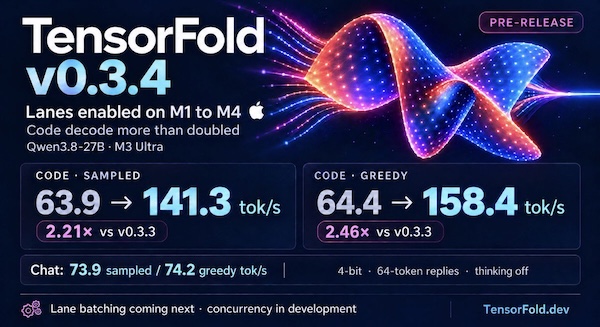
Installed TensorFold 0.3.4 on a 2021 MacBook Pro (M1 Pro, 32 GB) via uv tool install git+https://github.com/ashhart/TensorFold.git and ran it with TF_ROW_MATMUL=row_qmv tensorfold serve Vontra/Qwen3.8-27B-MLX-4bit. The TF_ROW_MATMUL=row_qmv setting switches to an older fallback path, because the new v0.3.4 kernel for M1-M4 Macs crashes at load on M1 and M2 models.
Benchmarked both projects with a script crafted by Opus 5.5 in Claude Code:
Results
Splash-M1 ran Qwen3.8-27B chat about 1.3-1.5x faster than TensorFold, though that may change once the M1/M2 bug is fixed:
Splash-M1
incoai/Qwen3.8-27B-Splash at http://127.0.0.1:8000: chat, thinking off, 64 tokens, median of 5
  sampled   13.0 tok/s   (runs: 10.1, 13.0, 14.4, 11.2, 16.4)
  greedy    14.5 tok/s   (runs: 11.6, 14.4, 14.5, 14.5, 14.5)
TensorFold
Qwen3.8-27B-MLX-4bit at http://127.0.0.1:8080: chat, thinking off, 64 tokens, median of 5
  sampled    9.7 tok/s   (runs: 9.8, 9.5, 9.7, 9.4, 9.7)
  greedy     9.7 tok/s   (runs: 9.6, 9.7, 9.7, 9.7, 9.7)
p2p.kiwi is a free and open source desktop conferencing and screen-sharing app from The Don't Be Evil Company for macOS, Windows, and Linux. It connects participants without requiring accounts, using STUN to help establish direct peer-to-peer connections and optional TURN relays when needed. Under the hood, it uses WebRTC for transport, MLS for group key management, and SFrame for end-to-end media encryption.
Increasing a UTM virtual disk's size does not automatically expand the guest's APFS container. If a Recovery partition lies between the container's partition and the added free space, it blocks direct expansion.
This Codex/Astra-crafted script uses Python 3.9+ standard library and macOS diskutil, cp, and lsof; no pip packages, Go, Homebrew, or QEMU are required. It targets macOS 26+ with diskutil image support and an APFS host filesystem for copy-on-write backups:
Usage
Shut down the VM and do not start it while the script runs. Pass either the .utm bundle or its writable disk image. Inspection is the default:
The size is GiB, so 200 means 214,748,364,800 bytes (Disk Utility displays about 214.7 GB). An initial 120 GiB image therefore gains 80 GiB. The main APFS container is smaller than the disk because ISC and outer Recovery retain their space.
What it does
Resolves the single writable image from an Apple-backend UTM bundle, or accepts an image directly. Rejects physical devices, images currently open by another process, shrinking, and unexpected partition layouts.
Attaches read-only for inspection. Validates both GPT headers and partition arrays, their CRCs, partition bounds/order, and Recovery's APFS superblock geometry.
With --apply, hashes the entire Recovery partition and creates a native APFS clone backup of the image.
Uses diskutil image resize --image-only to grow the image. On a tested macOS 27 build, this already relocates Recovery for ASIF images.
If needed, relocates Recovery itself through the attached raw device. It derives usable space from actual device capacity and GPT array dimensions, preserves APFS block alignment, copies and SHA-256-verifies Recovery before updating GPT, and writes both GPT copies with new CRCs. Partition IDs, names, attributes, and unrelated entries are preserved.
Checks Recovery against its original full SHA-256, detaches/reattaches to refresh the kernel's partition map, and expands the main APFS container using diskutil apfs resizeContainer ... 0.
Verifies the partition map and checks the final GPT layout fills the space up to Recovery. APFS's resize operation also performs a filesystem consistency check.
Only exactly three outer partitions, in physical order ISC / APFS / Apple_APFS_Recovery, are supported. Matching uses the Recovery type GUID, not a guessed name. Raw and ASIF image interpretation is delegated to macOS. The relocation core supports 512- and 4096-byte logical sectors. Growth smaller than or equal to Recovery's size is deliberately refused to avoid an overlapping copy. Already-grown images can be completed by requesting their existing capacity.
Failure and rollback
This is not a crash-atomic disk transaction. A crash during GPT commit can leave its copies inconsistent; validation then fails closed. The script does not infer missing Recovery data from an NXSB signature, and does not attempt to repair a partially executed third-party resizer. The retained image backup is the rollback source. A copy interruption before GPT commit leaves the original Recovery and GPT intact, although unused destination space may have changed.
If anything fails, leave the VM stopped. Eject any attachment listed in the log before restoring. Replace the modified image with a copy of the retained backup at the exact original image path. Do not restore only the old GPT after APFS growth.
An encrypted/locked APFS guest may require unlocking its Data volume before APFS expansion; the script reports the native error rather than asking for or recording passwords. Do not launch UTM or attach the image in another app during the run; the initial open-file check is not an exclusive lock against other applications.
References
The workflow is based on the UTM discussion and yunyang088's Go resizer. The discussion documents the stale-GPT-end bug, fixed here by computing geometry from actual device capacity. This implementation takes a different interruption strategy: verified nonoverlapping copy before GPT publication, with a mandatory whole-image backup for rollback.
Finder: Copied pathnames no longer wrapped in single quotes!As before, pathnames with spaces get the single quote treatment, but the secret to disabling has been unlocked!
As for iOS 27, alas, not a single item on my longstanding, humble wishlist has been fulfilled. If Apple takes privacy and security as seriously as its marketing suggests, it would do well to learn from GrapheneOS.
Related & Updates
Disable the blue "Writing Assistance" popup: System Settings → Screen Time → Restrictions → turn on "Content & Privacy" → (optional: Siri → Siri: Don't Allow Siri) → disable "Writing Assistance" (and other unwanted Capabilities as desired)
Disable AI-generated reply suggestions in Messages and Mail: System Settings → Keyboard → Text Input → Input Sources → Edit… → All Input Sources → disable "Show suggested replies" & "Show inline predictive text"
If Safari's active tab is too bright in dark mode, turn off "Reduce Transparency" in System Settings → Accessibility → Display.
If the volume, display brightness, or keyboard brightness On-Screen Display (OSD) sliders/horizontal bars go missing, killall ControlCenter may restore them:
USB storage bridges may expose ATA commands via SCSI/ATA Translation (SAT), but ATA Security behavior varies by bridge and firmware. Without an explicit vendor guarantee, reported capabilities alone do not confirm that a command can pass through the bridge and execute successfully on the drive.
To avoid orphaning data on the platters in the event of lockout, a 1 TB WD My Passport USB HDD was zeroed with dd then queried for ATA Security support:
hdparm -I /dev/sdX

/dev/sdX:

ATA device, with non-removable media
    Model Number:       WDC WD10JMVW-11AJGS1
...
Security:
    Master password revision code = 48059
        supported
    not enabled
    not locked
    not frozen
    not expired: security count
        supported: enhanced erase
    332min for SECURITY ERASE UNIT. 2min for ENHANCED SECURITY ERASE UNIT.
...
Setting a password appeared to work:
hdparm --user-master u --security-set-pass p /dev/sdXsecurity_password: "p"
/dev/sdX:
Issuing SECURITY_SET_PASS command, password="p", user=user, mode=high
In other words, something in the storage path reported that the SCSI command descriptor block (cdb) used to carry the ATA request contained an invalid or unsupported field.
hdparm -I /dev/sdX initially continued to return the correct device information. However, after disconnecting and reconnecting the drive, it reported only:
/dev/sdX:

ATA device, with non-removable media
Standards:
    Likely used: 1
Configuration:
    Logical     max current
    cylinders   0   0
    heads       0   0
    sectors/track   0   0
    --
    Logical/Physical Sector size:           512 bytes
    device size with M = 1024*1024:           0 MBytes
    device size with M = 1000*1000:           0 MBytes
    cache/buffer size  = unknown
Capabilities:
    IORDY not likely
    Cannot perform double-word IO
    R/W multiple sector transfer: not supported
    DMA: not supported
    PIO: pio0
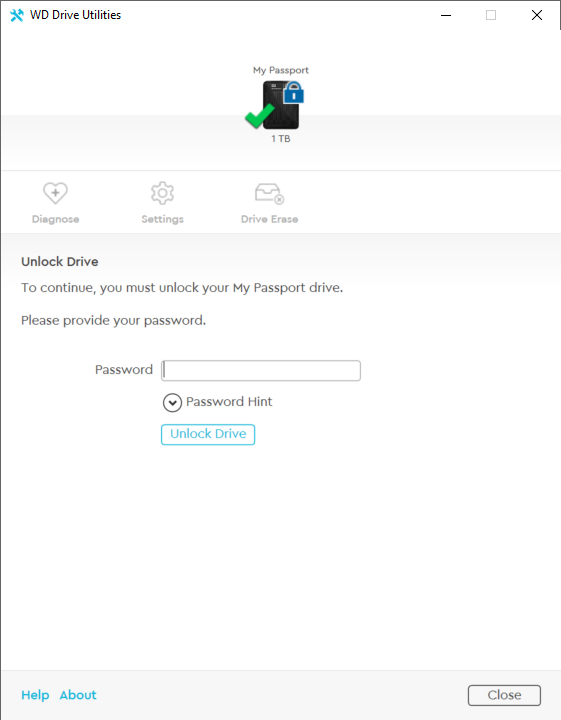
Launch WD Drive Utilities; the Unlock Drive prompt will appear:
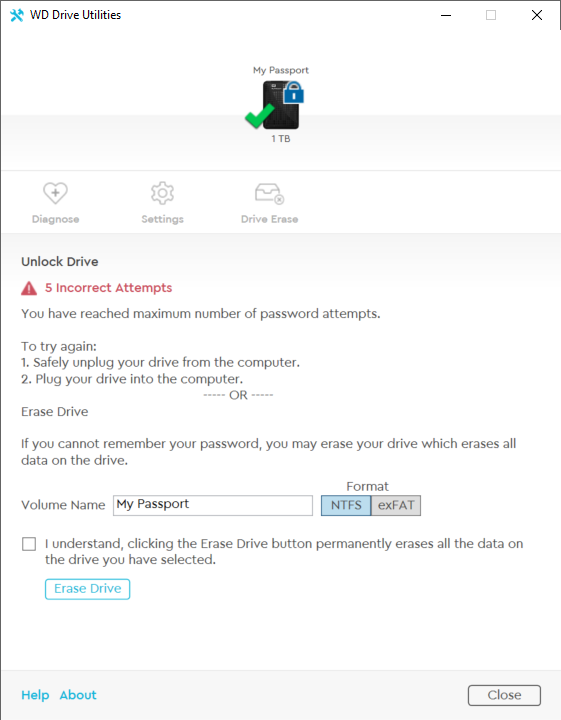
The password set with hdparm will not be accepted; enter any password five times to reveal an erase option (the Drive Erase icon remains unavailable while the drive is locked):
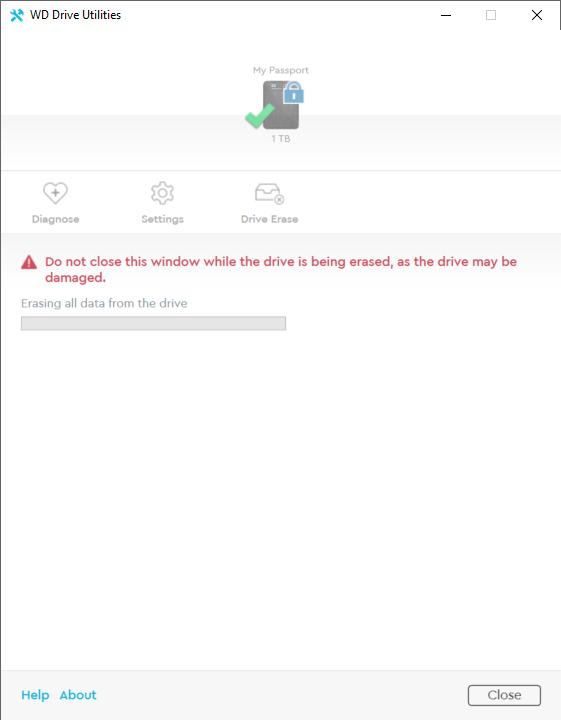
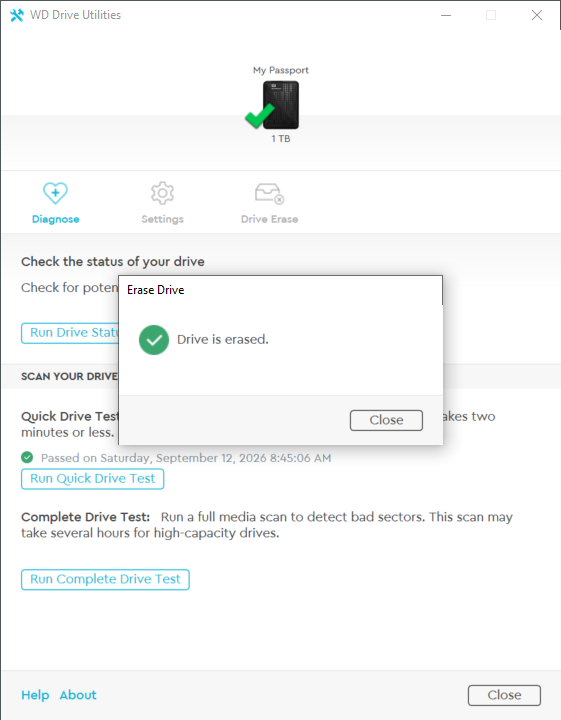
Set volume name and format, acknowledge the warning, and click Erase Drive. The utility erases and reinitializes the drive, restoring access:
wdpassport-utils.py --device /dev/sdXDevice: /dev/sdX
Security status: Locked
Encryption type: Full Disk Encryption
Attempting to unlock the drive using the password set with hdparm fails, just as it does in WD's own utility:
wdpassport-utils.py --device /dev/sdX --unlock[wdpassport] password for /dev/sdX:
[!] Key hash parameters are not valid.
Erasing the drive, however, restores access:
wdpassport-utils.py --device /dev/sdX --erase[+] All data on /dev/sdX will be lost. Are you sure you want to continue? [y/N]
y
[*] Device erased. You need to create a new partition on the device (Hint: fdisk and mkfs)hdparm -I /dev/sdX
/dev/sdX:
ATA device, with non-removable media
Model Number: WDC WD10JMVW-11AJGS1
...
device size with M = 1000*1000: 1000171 MBytes (1000 GB)
cache/buffer size = 8192 KBytes
Nominal Media Rotation Rate: 5400
...
Inspired by tigerblue77's AI-generated, zero-dependency unlock and eject scripts (themselves inspired by Kenny MacDermid's wdpassport-utils), I asked Astra to build a similar script for erasing WD My Passport drives. It produced erase_wd_passport.py in one shot, using only the Python 3 standard library: no pip packages, sg3-utils, hdparm, pyudev, or compiled extensions required. Tested on the 1TB drive mentioned above; your mileage may vary. All existing data will be lost, and the drive itself may be rendered unusable. Proceed at your own risk (and joy).
Usage
Without --erase, the script only queries WD encryption status:
python3 erase_wd_passport.py /dev/sdXDevice: /dev/sdX
USB product: My Passport 07A8
USB serial: XXXXXXXXXXXXXXXXXXXXXXXX
Security: Locked (0x01)
Cipher: 0x30; key length: 32 bytes
To erase, unmount any mounted filesystems on the disk, then run:
python3 erase_wd_passport.py /dev/sdX --eraseDevice: /dev/sdX
USB product: My Passport 07A8
USB serial: XXXXXXXXXXXXXXXXXXXXXXXX
Security: Locked (0x01)
Cipher: 0x30; key length: 32 bytes
ALL data on this disk will become inaccessible. Keep it connected.
Type 'ERASE /dev/sdX' to continue: ERASE /dev/sdXSending WD key reset...
WD key-reset command completed successfully.
After reset: No lock (0x00)
Reported capacity: 1,000,170,586,112 bytes
First sector is readable.
Create a new partition table and filesystem before use.
What it does
The script implements the WD encryption-key reset from 0-duke/wdpassport-utils using standard-library ctypes and fcntl.ioctl. Before resetting, it verifies the whole-disk path and WD My Passport USB identity, checks for mounts, swap, and block-device holders, opens the device exclusively, and requires explicit confirmation. It then queries the drive's encryption status and current reset token and sends WD's vendor-specific key-reset command (C1 E3), intended to replace the internal data-encryption key and make existing data inaccessible. The request includes random bytes, following upstream's implementation, but whether the firmware uses them is unverified. Afterward, the script checks security status, capacity, and first-sector readability, then requests a partition rescan. These checks confirm basic access, not secure sanitization: the operation does not overwrite user-data sectors, create a filesystem, or perform ATA SECURITY ERASE. Firmware support varies, and this is not a general fix for "SG_IO: bad/missing sense data" errors.
Drive diagnostics: SMART attributes, Seagate FARM logs, HPA and ATA password detection, and identification of the underlying drive behind USB bridges.
Flash identification and testing: USB controller details, NAND IDs via controller-specific commands, fake-capacity detection, and surface scans for bad sectors.
Imaging and cloning: Raw sector images, dynamic VHD/VHDX images, partition images, disk-to-disk cloning, and file extraction from images.
Filesystem and partition recovery: MBR/GPT recovery and file browsing/copying across FAT, exFAT, NTFS, Ext2/3/4, HFS+, APFS, and BTRFS.
RAID and DVR recovery: Automatic reconstruction of striped, mirrored, RAID-5, and RAID-6 arrays from disks or images, plus searches for DVR recordings.
Low-level tools: Sector hex viewing/editing and, in version 6.0, microcode patching intended to restore file access on supported failed SSDs, starting with Phison-based models.
Beyond storage: Reading and repairing errors in DDR4 and DDR5 memory SPD dumps.
In the last update, I asked u/Routine_Eye3806 if he had shared Easy Disk Checker on HDDGURU, to which he replied that he hadn't but would appreciate me sharing it there. My submission has not received moderator approval after 2 days, so I am posting it here instead.
Create the VM with "Install drivers and SPICE tools" unchecked (otherwise, clicking "I don't have a product key" during setup will fail with "Setup has failed to validate the product key").
Disconnect from the network, then install Windows.
Customize Windows as desired (taskbar, desktop background, dark mode, File Explorer, Edge, etc.), shut down, and save as your reference image.
Reconnect to the network, clone the reference VM, and boot the clone.
Windows should activate automatically and the desktop watermark change from "Windows License is expired" to "Windows License valid for 90 days". If not, run cscript //nologo %windir%\system32\slmgr.vbs /ato and reboot. If activation fails due to no network connectivity, try setting a public DNS server or switching from Shared Network to Bridged (Advanced).
After years of happy Rectangle and Spectacle use, had missed that native window tiling was added in macOS Sequoia: Settings → Keyboard → Keyboard Shortcuts… → Windows.
Linux Mint (first boot after an OEM install): Ctrl+Alt+F2 → once the text console appears, quickly press and release the power button to shut down safely. GRUB may appear on next boot; one complete startup clears recordfail and re-hides the menu.
Inspect Content Credentials: "Content Credentials are still rolling out, so the content you choose to inspect may not have information to view."
SynthID Detector: "Detect invisible AI watermarks from ChatGPT, Google Gemini, and Imagen. Works on text, images, and audio — results in under 3 seconds." One free check then signup required.
"It's quite common for webmail clients to render untrusted CSS in a trusted UI. They attempt to make this safe using CSS sanitization. In this paper I'm going to show you how to break out of trust boundaries, exfiltrate tokens, compromise 3rd party websites and even steal passwords."
Besides Why, in my day..., the other Slashdot meme from yesteryear that never failed to amuse is "If only there was|were some kind of..."
However, Google, Kagi, and even Slashdot's own site search were all coming up empty. To satisfy nostalgia, cobbled together these stylized versions with Claude Opus 4.6:
If only there were some kind of enormous, interconnected network of computers, perhaps spanning the entire globe, upon which someone had built a system for indexing and retrieving information using simple keyword queries. Alas, we can but dream.
What we really need is some sort of "engine" if you will, specifically designed for "searching". We could type words into a box and it would locate relevant documents from across the world's collected knowledge in mere fractions of a second.
These were the platonic ideal of what memory served up, but the desire for pure, unadulterated, human-crafted wit remained. Went in search of a Slashdot archive and hit paydirt with Sketch the Cow's Slashdot Story Archive (HTML Format), which spans 1998 to 2019. Spelunked like so:
% du -sh stories.7z | awk '{print $1}'8.6G
% time ugrep -z -E "if only there (was|were) some kind" stories.7z > results.txt...6:35.92 total
"[I]f only there was some kind of searching engine one could use, or some kind of encyclopedia in the form of a wiki where one could look up this information... Maybe some day."
"[I]f only there was some kind of searchable, massive collection of computers that were all hooked together somehow, and contained this kind of information."
After a quarter century in the wilderness, the caravan has gratefully pitched its tent beneath the shady palms of Pagefind. At last, everything is indexed and searchable.
The JavaScript dependency (like Algolia's) is unfortunate, but a small concession for search that's self-hosted, static, and complete. Pagefind is open source and a snap to set up and use.
Knockoff "filters the trademark-squat pseudo-brands (the SZHLUXes and HORUSDYs) out of your search results, so what's left is brands with a reputation to lose."
"Ever wanted a GoTek for CDs? If you have a Raspberry Pi Zero W or 2 W, USBODE turns it into a virtual optical drive. It allows you to store many disk images on a MicroSD card and mount them through a web interface."
Known-supported models: Raspberry Pi Zero (2015), Raspberry Pi Zero W (2017), Raspberry Pi Zero 2 W / WH (2021), Raspberry Pi 3 Model A+ (2018), Raspberry Pi 4 (2019)/4B (2019).
DiskImageMounter.app silently fails to mount Linux ISOs in macOS and hdiutil attach linux.iso returns "attach failed - Resource temporarily unavailable". However, the built-in tar (bsdtar 3.5.3 in Tahoe) command can list contents:
tar tf /path/to/linux.iso
and extract files:
tar xf /path/to/linux.iso -C ~/extracted/
See also anylinuxfs ("mount any linux-supported filesystem read/write using NFS and a microVM") mentioned earlier this year.
The alternating character/NUL pattern is UTF-16LE (UTF-16BE is the reverse, 00 54 00 68 ...). So fix is stored as 66 00 69 00 78 00, and grep fix fails to match the ASCII/UTF-8 bytes 66 69 78. cat output looks normal because terminals typically don't render the NUL bytes.
Solution
Convert to UTF-8 before grepping:
iconv -f UTF-16LE -t UTF-8 foo.txt | grep fixBy such as fix their faith on Unity.
Use UTF-16BE instead if the byte pattern is big-endian.
Why UTF-16LE and not plain UTF-16?
With a BOM, plain UTF-16 works everywhere: iconv reads the BOM and picks the byte order automatically.
Without a BOM, iconv's behavior is implementation-dependent. Common GNU/Linux and macOS iconv implementations differ: little-endian on GNU iconv, big-endian on macOS. The same file can convert on one platform but fail on another:
iconv -f UTF-16 -t UTF-8 foo.txt | grep fix # not portable for BOM-less inputiconv -f UTF-16LE -t UTF-8 foo.txt | grep fix # explicit byte order
For BOM-less UTF-16, use UTF-16LE or UTF-16BE, not plain UTF-16.
Handling conversion errors
If iconv stops with illegal input sequence, -c can skip invalid input:
Booted a Dell OptiPlex 7090 Micro from Windows 10 and 11 ISOs via an iodd Mini PRO without issue. Changed SATA Operation from RAID / Intel RST to AHCI* to expose the internal NVMe SSD; external boot still worked. Copied data off the internal drive, then wiped it with diskpart's clean command.
Post-wipe, external boot attempts failed: selecting the device in the Dell boot menu and pressing a key at the "Press any key to boot from CD or DVD..." prompt led to a Dell SupportAssist "No bootable devices found" screen, with just a Continue button which rebooted the machine.
Fix: Disabling Secure Boot restored external booting. After installing Windows, re-enabled Secure Boot without issue.
Likely cause: Appears to be a Dell firmware bug rather than genuine signature rejection, since the firmware successfully ran the external media's first-stage loader (which displays the "Press any key" prompt) yet with Secure Boot enabled apparently failed the hand-off to the second-stage Windows Boot Manager; other Dell users have reported similar behavior.
Footnote
* Otherwise download Intel Rapid Storage Technology (Intel RST) Driver version 18.7.6.1010.3 (SHA256: A2B2E20D6D8100E9EE344746F80849524C64490B90686A13C09268CADB976B37) and extract the driver files viaSetupRST.exe -extractdrivers SetupRST_extracted. When "Select location to install Windows 11" appears, click Load Driver and browse to SetupRST_extracted\production\Windows10-x64\15063\Drivers\VMD\, which contains the Intel VMD controller driver (iaStorVD.sys) needed for Windows to detect drives behind Intel RST. Here is the full extracted directory structure for reference:
Damien Charlotin maintains a searchable, actively updated database (1,545 legal cases so far) tracking instances where generative AI produced hallucinated content in court filings worldwide. The full database is freely available in CSV format.
Damien also offers Pelaikan, an automated reference checker designed to catch hallucinations before they hit a docket (free tier includes 3 documents per month; paid plans available but pricing link is currently broken).
Legendary Windows dev Dave Plummer (whom we have to thank for Windows XP activation) just released BlinkenDisk for macOS, a "tiny macOS utility that puts a red LED in your menu bar and lights it up whenever there's I/O activity on the local drives you choose to monitor." H/T
Swift source is provided, but the license is unusually restrictive for a vibe-coded app; it reads in part (emphases added):
To the extent this code works, it was written by Dave Plummer (davepl), and to the extent it doesn't, please blame Claude and Codex. I've still never written a line of Swift in my life, but here we are.
Permission is granted to any individual person to download, install, run, copy, and modify this software for personal, non-commercial use, subject to the terms below.
Commercial use is not permitted without prior written permission from the copyright holder. Commercial use includes, without limitation, use by or for a business, company, government agency, nonprofit organization, educational institution, or other organization; redistribution as part of a paid product or service; use to support paid work; internal business use; or use that is primarily intended for commercial advantage or monetary compensation.
You may share unmodified copies of this software with other individual persons for their personal, non-commercial use, provided that this license file and all copyright notices remain included. You may not sell, sublicense, rent, lease, host as a service, or commercially redistribute this software without prior written permission.
Modified versions may be created for personal, non-commercial use. Modified versions may not be distributed without prior written permission from the copyright holder.
Tiny HDD activity monitors features similar Windows apps that are much smaller (e.g., 8k vs. 250k), more featureful, and, with one exception, open source with no apparent restrictions.
Andrew Warkentin has built a "virtual museum of operating systems (and standalone applications) running under emulation, implemented as a Linux VM for QEMU, VirtualBox, or UTM".
"[T]he Virtual OS Museum provides over 250 platforms on which over 600 different operating systems and a total of over 1700 versions and configurations can be launched. Andrew reportedly still has material for over 1000 more installations."
OpenExtract: "A free, open-source desktop application for extracting text messages, photos, voicemails, call history, contacts, and notes from iPhone/iPad backups. No cloud. No subscriptions. Your data stays on your computer." OpenExtract vs iMazing
Phosphor: "Free and open-source iOS device manager for macOS. Browse backups, export messages, extract photos, manage apps - no subscriptions, no iCloud lock-in." Phosphor vs iMazing & Finder
iDescriptor: "A free, open-source, and cross-platform iDevice management tool."
iTunes Backup Explorer: "A graphical tool that can extract and replace files from encrypted and non-encrypted iOS backups."
"From now on my mind is the material with which I have to work, as the carpenter has his timbers, the shoemaker his hides; my business is to make the right use of my impressions." —Epictetus
A user found their existing, long-held Gmail account (e.g., example@gmail.com) inexplicably and seemingly inextricably linked to an unwanted Google Workspace account (e.g., user@example.com), the MX records for which had never even been set up.
Google support forums contain misleading and confusing advice. A Gold Product Expert claims that:
"A Google Workspace account is a free standing account that uses a business domain name for its email address. It has to be created independently from any gmail.com account."
"If you used your gmail account to sign up for a Google workspace Individual Account and if you cancel it then you will lose your gmail account as the gmail account will be permanent link to Google workspace Individual Account"
Cancel all your subscriptions and subscription data.
"With either cancellation option, you lose access to premium Google Workspace services, your Admin console, and any billing records right away. You still have access to some Google Workspace services, such as Gmail, Google Calendar, and Google Meet, as well as other Google services, such as YouTube, Google Photos, and Google Ads, through your personal Gmail address. Personal data associated with these services is retained."
A number of users (1, 2, 3, 4, 5, 6) report success with cancelling the Google Workspace subscription: Google Admin → ☰ menu → Billing → Subscriptions → click your subscription → More → Cancel Subscription.
The aforementioned user contacted Google Support for guidance. Rather than directing them to cancel the subscription, support walked them through a more circuitous route:
Create a new user (admin@example.com) and assign it the super admin role.
Remove the super admin role from the original account (user@example.com), then delete that user.
When prompted during deletion, transfer data to admin@example.com.
Data migration (~100 GB) took about 45 minutes; upon completion, a popup window entitled "YOUR TASKS" displayed "Removed example@gmail.com."
Signing in to example@gmail.com showed a message which read in part: "Your account has been removed from an organization: Your admin has converted your managed Google Account to a consumer account."
Email, contacts, and photos were intact in example@gmail.com. Google Drive files were not - they'd been transferred to admin@example.com; Google Takeout on that account was used to recover them.
Google Support should have instructed the user to back up via Google Takeout before beginning the migration, and perhaps should have skipped it entirely in favor of simply cancelling the Workspace subscription.
Enable Develop menu: Settings… → Advanced → check "Show features for web developers"
Press Cmd+Opt+I
Click "Elements" → right-click <html> tag → click "Capture Screenshot"
The feature is present as of Safari 11.1.2 in OS X 10.11.6 (missing in Safari 10.1.2/OS X 10.10.5): Preferences… → Advanced → enable "Show Develop menu in menu bar".
The world's dust
Swept aside
No care for the future—
In my hermitage I have all I need:
The wind in the pines.
Two scrolls (1, 2) attributed to Rengetsu have the original as:
世のちりを
よそにはらひて
ゆく末の
ちよをしめたる
やとの枩風
In modern Japanese:
世の塵を
余所に払いて
行く末の
千代を占めたる
宿の松風
The elided line, ゆく末のちよをしめたる (literally "go end <possessive particle> thousand ages <direct object marker> secure <classical past/perfect ending>"), resists idiomatic translation. It conveys the sense of securing prosperity or continuity for "a thousand ages"/forever.
Presenting from a laptop often means craning your neck to check what the audience sees. The following workflow creates a controlled presenter setup: selected apps launch maximized on the projector, the projector view is mirrored back to the MacBook with click-through support, and notes remain isolated on the laptop display.
1. Set the projector as an extended display
System Settings → Displays → select the projector/external display → Use as: Extended display
-- Auto-move and maximize QuickTime Player and Preview windows
-- on the first external display.

hs.window.animationDuration = 0

local wf = hs.window.filter.new({
  "QuickTime Player",
  "Preview",
})

local function externalScreen()
  local primary = hs.screen.primaryScreen()

  for _, screen in ipairs(hs.screen.allScreens()) do
    if screen:id() ~= primary:id() then
      return screen
    end
  end

  -- Fallback if no external display is connected.
  return primary
end

local function moveAndMaximizeWindow(win)
  if not win then return end

  local winID = win:id()
  if not winID then return end

  local function apply()
    local currentWin = hs.window.get(winID)

    if not currentWin or not currentWin:isStandard() then
      return
    end

    local targetScreen = externalScreen()

    if targetScreen and currentWin:screen():id() ~= targetScreen:id() then
      currentWin:moveToScreen(targetScreen, false, true, 0)
    end

    currentWin:maximize()
  end

  -- First pass after the window is created.
  hs.timer.doAfter(0.25, apply)

  -- Second pass catches apps that restore/resize shortly after opening.
  hs.timer.doAfter(0.75, apply)
end

-- Only handle newly-created windows.
-- This avoids fighting manual resizing during the presentation.
wf:subscribe(hs.window.filter.windowCreated, moveAndMaximizeWindow)

-- Handle existing matching windows when Hammerspoon loads/reloads.
hs.timer.doAfter(0.5, function()
  for _, win in ipairs(wf:getWindows()) do
    moveAndMaximizeWindow(win)
  end
end)

hs.alert.show("Auto-move/maximize QuickTime/Preview loaded")
Add or remove managed apps using their exact names in the Hammerspoon window filter.
3. Install and start Side Mirror
Install Side Mirror, select the projector/external display from drop down menu at top right, then click Start.
4. Presenting
Opening QuickTime Player or Preview-associated files will display them in full screen on the projector. Use Side Mirror on your MacBook to see and control the projected content. Clicking through moves focus and your cursor to the external display; recover via Opt+Shift+Return.
If you have multiple external displays, replace:
local function externalScreen()
  local primary = hs.screen.primaryScreen()

  for _, screen in ipairs(hs.screen.allScreens()) do
    if screen:id() ~= primary:id() then
      return screen
    end
  end

  return primary
end
with:
local function externalScreen()
  return hs.screen.find("BenQ") or hs.screen.primaryScreen()
end
Replace "BenQ" with a substring matching your projector's display name. You can list connected display names in the Hammerspoon console with:
Screen Guard (listed as free with no IAP, but the demo video briefly displays "Note: some features in this video require payment to unlock" near the end, 8.8MB): "Instantly hide apps you choose"
Many posts suggest restarting in Safe Mode and simply deleting CapabilityAccessManager.db-wal; however, that unfortunate approach reportedly breaks WiFi, screen capture, Settings, and more.
u/Ancient-Reply2879 and Pony appear to have independently arrived at the correct method: delete the folder (C:\ProgramData\Microsoft\Windows\CapabilityAccessManager\) rather than the file (C:\ProgramData\Microsoft\Windows\CapabilityAccessManager\ CapabilityAccessManager.db-wal).
Refactored a PowerShell script shared by Anonymous (2024) and jsmorley (2025) to delete the directory rather than the contents:
"[A] file linked to Capability Access Manager continues to fill the system drive until it runs out of storage. ... If your PC is affected, the safest fix is to install Windows 11 KB5095093 from Windows Update, or wait for the July 2026 Patch Tuesday update, where the fix is expected to roll out automatically"
Almost-perfect solution, with one limitation: catch-all matching works for sender or message content, not both simultaneously. Feedback filed with Apple via Feedback Assistant.
Shortcuts → Automation
New Automation → Message
Leave Sender as Any Sender to match all senders or leave Message Contains as Choose to match any text message content - at least one field must have a value to enable Next (Message Contains sadly does not support regex; a single space suffices, though messages containing no spaces will be missed)
Change Run After Confirmation to Run Immediately → Next
Create New Shortcut → Send Message → Message → e.g., "I am out of the office"
Tap and hold Recipients → Shortcut Input
Tap checkmark icon at top right to save
Handles both iMessage and SMS, runs immediately without interaction, and executes even with the screen off.
Wuqiong Zhao's pdfcrop Web App is sublimely fit to purpose. Tried wrangling a Tauri-based portable Windows app out of it with Claude 4.6 Opus, Gemini 3.1 Pro, and GPT 5.4 over several hours with little to show for it.
Dear friend and AI whisperer Josh adroitly conjured up a wonderful solution using Copilot & GPT-5.4-high in a twinkling, even fixing crop-box handle resizing along the way:
Successfully tested the following build steps in Windows 11 24H2 ARM64, macOS 26.4.1 Tahoe, and Ubuntu Linux 22.04:
macOS Mojave and earlier store sticky notes in a single file, ~/Library/StickiesDatabase. Catalina and later use ~/Library/Containers/com.apple.Stickies/ (Finder displays it as ~/Library/Containers/Stickies/), with RTFD files in ./Data/Library/Stickies/ and note color and window positioning data stored in ./Data/Library/Preferences/com.apple.Stickies.plist.
For many macOS upgrade scenarios that straddle this divide (e.g., High Sierra to Sequoia), the database migration silently fails. Even in the best case (as when upgrading from Mojave to Catalina), colors revert to yellow and window positioning is lost.
Solutions
Stickies.app 10.2 (build 138) from macOS 10.14.6 can be copied to Tahoe alongside ~/Library/StickiesDatabase and runs successfully; colors and window positions are preserved. "Export Text…" (Plain Text, RTF, RTFD) works; "Export All to Notes…" does not.
If preserving sticky note colors isn't necessary, simply restore ~/Library/StickiesDatabase to a clean macOS 10.15, 11, 12, or 13 instance; Stickies will populate com.apple.Stickies from it on first launch (fails under macOS 14, 15, & 26).
1. In Mojave, restore a backup of ~/Library/StickiesDatabase. 2. Optionally export to Notes.app (File → Export All to Notes…) for posterity; colors are preserved as folder names. The Notes database (~/Library/Group Containers/group.com.apple.notes) can be imported as-is into modern macOS versions. 3. Upgrade Mojave to Catalina; com.apple.Stickies can now be imported into later versions including Tahoe. Colors must be manually corrected (or perhaps scripted to extract values from StickiesDatabase and insert into com.apple.Stickies.plist, an exercise left for the reader). Windows can be un-stacked via AppleScript; this example (tested in Catalina and Tahoe) uses a 5-column layout:
tell application "Stickies" to activate

tell application "System Events"
    tell process "Stickies"
        set winList to windows
        set winCount to count of winList

        set numColumns to 5
        set noteWidth to 300
        set noteHeight to 200
        set xGap to 20
        set yGap to 20
        set baseX to 50
        set baseY to 50

        repeat with i from 1 to winCount
            set colIndex to ((i - 1) mod numColumns)
            set rowIndex to ((i - 1) div numColumns)
            set theWin to item i of winList
            set position of theWin to {baseX + colIndex * (noteWidth + xGap), baseY + rowIndex * (noteHeight + yGap)}
            set size of theWin to {noteWidth, noteHeight}
        end repeat
    end tell
end tell
pystickies: "Converts the database from the Mac's 'Stickies' program into RTF files, one per sticky. This is platform-independent, it doesn't use Cocoa to do the conversion, but rather uses heuristics to find the RTF data within the Stickies database."
pytypedstream: "A pure Python, cross-platform library/tool for reading Mac OS X and NeXTSTEP typedstream files. ... the typedstream data format is still used by some macOS components and applications, such as the Stickies and Grapher applications."
StickiesDbConverter: "Brief python script for exporting a StickiesDatabase file on macOS to a plain text file."
Granted, this is with Maildir enabled and hundreds of thousands of messages across dozens of folders, but the bug had never appeared when the account was configured as IMAP in Thunderbird, so have switched back for now. (The new account had to be set up manually, then switched to OAuth for both IMAP and SMTP, as it wasn't offered otherwise (setup in a fresh Thunderbird profile worked normally). One downside of returning to IMAP: syncing changes to macOS Mail once again requires quitting Thunderbird.)
Update
While penning this post, happened upon an open bug from 17 years ago:
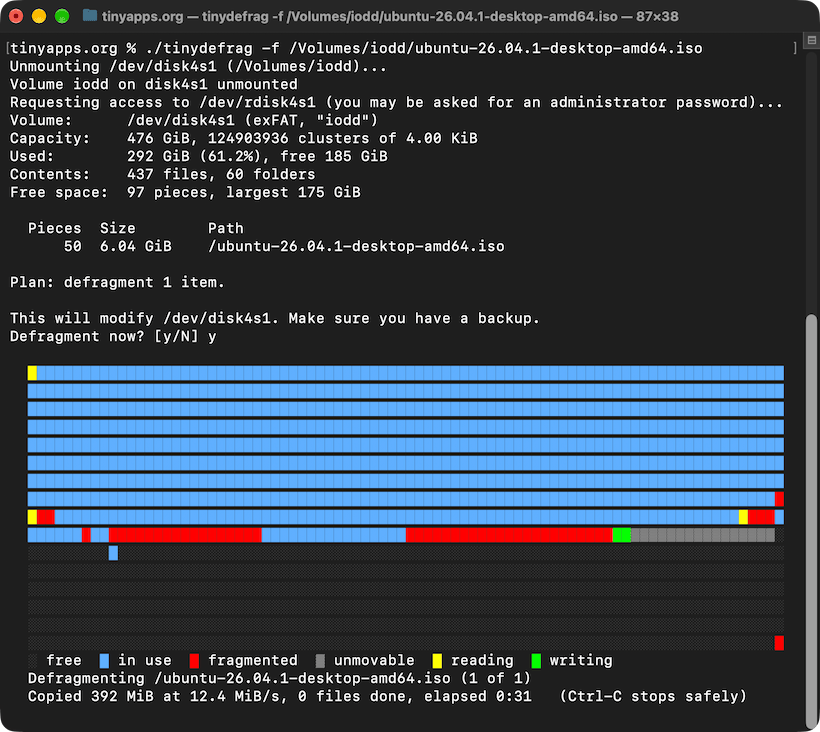
The IODD Guide explains that "The ISO/VHD file is too fragmented to load (Max 24 fragments for ISO; 0 for VHD)." and suggests "Use defragmentation utilities like MyDefrag (dead link) or Defraggler."
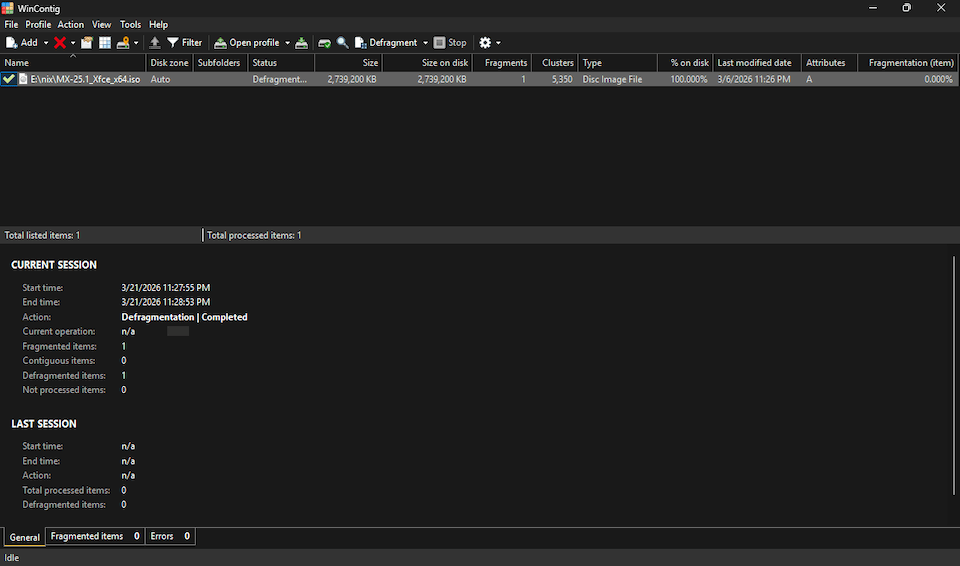
Another option is WinContig (H/T), a green, portable app that merited a rare addition to the System page:
🌱WinContig v5.0.3.3 [961K] + "Quickly defragment individual files without the need to defragment the entire disk." Supports Windows Vista through 11, server versions from 2008 to 2019, and FAT, FAT32, exFAT, NTFS, and ReFS filesystems. 📺
Updates
Initially skipped SysInternals' Contig, believing it only supported NTFS as claimed on Wikipedia ("Supported file systems: NTFS") and even more explicitly on Grokipedia ("It exclusively supports the NTFS file system, leveraging the native Windows NT defragmentation API introduced in NT 4.0, and does not function on FAT, exFAT, or other file systems."). However, version 1.83 successfully defragmented an ISO file on an exFAT-formatted drive.
IODD offers VHD Tool++, a portable app with a number of functions including file defragmenting. However, the current version (0.8.0.1) simply wraps Contig, which is bundled inside. (Curiously, VHD Tool++ is not mentioned on IODD's own error messages page, which instead recommends MyDefrag and Defraggler as noted above.)
Attempting to load newly-imported ISOs on an IODD MINI caused it to freeze. Contig reported the files as fragmented; defragging them resolved the issue.
MX Linux, built on Debian Stable and offered in Xfce, KDE, and Fluxbox flavors, booted a 2012 iMac faster than any of the standard distros, with WiFi and sound working out of the box.
OEM installation is as easy as booting from the ISO and running sudo minstall --oem in the terminal (default accounts: demo/demo, root/root).
"Run classic Windows and DOS executables directly in your browser. No installation required. Just drag, drop, and watch programs come alive in a web page.
"RetroTick is an x86 virtual machine and Windows/DOS API compatibility layer built from scratch in TypeScript. It parses PE (Win32), NE (Win16), and MZ (DOS) binaries, executes x86 machine code instruction by instruction, and reimplements a subset of the Win32, Win16, and DOS API surface, enough to boot several .exe files from the classic Windows era and render their GUIs in the browser."
The developer shared on HN: "Hidden feature: right-click any executable and select 'View Resources' to browse its embedded resources like icons, bitmaps, dialogs, and version info. It even supports viewing Delphi forms (though Delphi programs can't actually run yet). Think of it as a browser-based Resource Hacker or eXeScope."
retrowin32 "is a still-early Windows emulator for the web (and other non-Windows platforms). Take a win32 .exe file and run it in a web browser or a Mac. See some demos."
iOS 26.2 broke MileBug at last (UPDATE: Just discovered it is working once again in iOS 26.5.2!); it hadn't been updated in years, the founder having apparently sold to Bending Spoons in 2018.
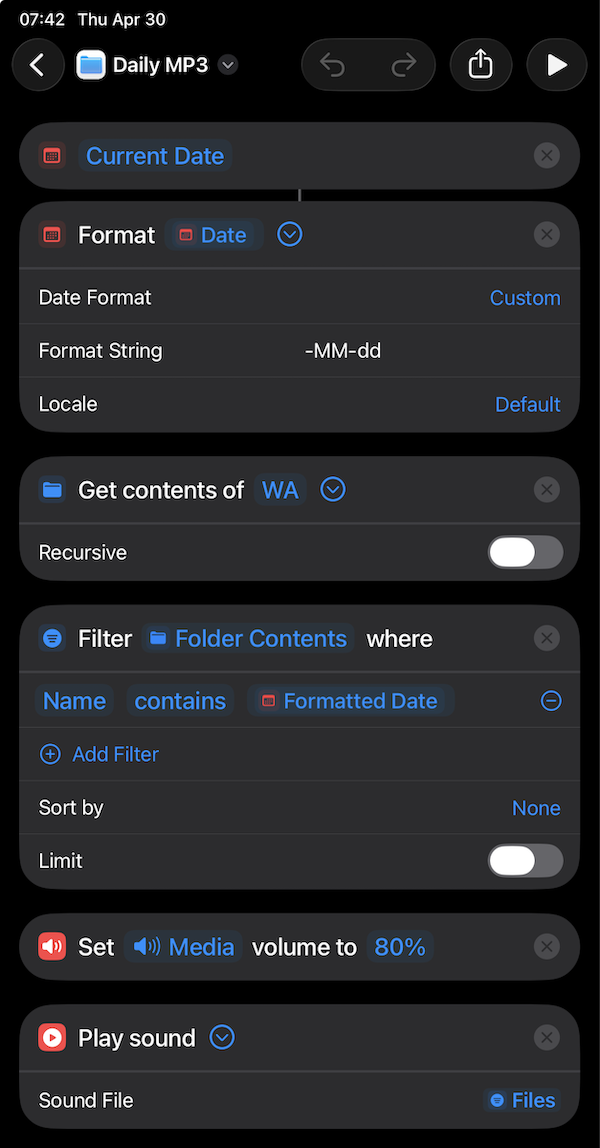
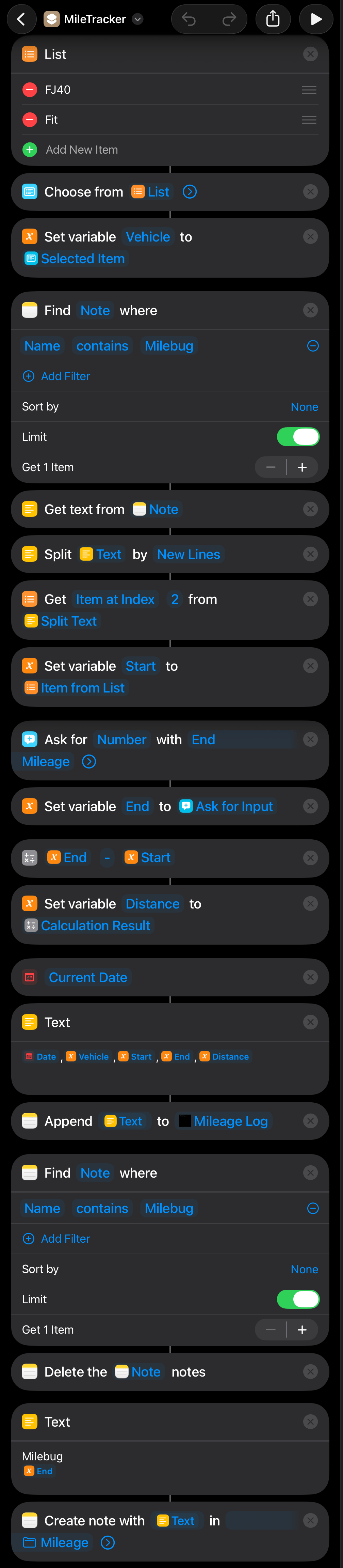
Failing to find a simple mileage tracker in the App Store, I cobbled together a Shortcuts workflow which does the job:
Setup
Create two files in On My iPhone/Shortcuts/:
log.csv with the header line Date,Vehicle,Start,End,Mileage
start.txt with your current odometer reading (e.g., 12345)
Workflow
Open Shortcuts and create a new shortcut with the following actions and values:
List - Replace the default One and Two with your vehicles (e.g., FJ40 and Fit)
Choose from List
Get File from Folder - Clear the auto-populated Selected Item, browse to On My iPhone/Shortcuts/, and change example.txt to start.txt
Get Numbers from Input - Keep the File token from step 3
Set Variable - Set Variable Name to Start and keep the Numbers token from step 4
Ask for Input - Change Text to Number and set Prompt to End Mileage
Set Variable - Set Variable Name to End and keep the Ask for Input token from step 6
Calculate - End - Start
Text - Tap these variable tokens from the Select Variable popup, adding a comma between each: [Current Date],[Selected Item],[Start],[End],[Calculation Result] (set Current DateDate Format to Short and Time Format to None)
Append to Text File - Keep the Text token from step 9; verify the path is On My iPhone/Shortcuts/, change example.txt to log.csv, and leave Make New Line on
Save File - Touch and hold Appended File, tap Variables..., tap End, expand the action, then turn off Ask Where to Save, set Subpath to start.txt, and turn on Overwrite If File Exists
Usage
Run the shortcut, pick a vehicle, and enter the end mileage. The shortcut then:
Reads the start mileage from start.txt
Appends the trip to log.csv
Updates start.txt with the end reading, ready for the next trip
If miles were added without logging (e.g., after switching vehicles or an untracked drive), edit start.txt to match the actual odometer before the next run.
Notes
Tap the arrow next to the shortcut name at the top of the screen to access Rename, Choose Icon, and Add to Home Screen options.
To resolve access or permissions issues, tap the ⓘ button on the shortcut and check Privacy settings.
Plain text editors like Subtext and Neon Vision Editor make creating and editing text files easy. To set one as the default handler for a file type, touch and hold a file in Files, choose Get Info, and set Always Open With to the desired app. It also helps to enable Show All Filename Extensions (tap the three-dot icon in the top-right corner of Files, then View Options).
"Open GPX Tracker is a GPS logger for iOS (iPhone, iPad, iPod) with offline map cache support. Track your location, add waypoints and send your logs by email as GPX files.
"This app has no annoying time restrictions, no ads and no in-app-purchases. You can create unlimited GPX traces :).
"If you are goint to track without Internet... don't worry! Before you go offline, browse the area where you'll be tracking and it will be cached and available offline.
"We care about your privacy, all the data recorded using the application is kept in your phone (or in your iCloud), wherever you store it. The app does not share any GPS data with us or any other 3rd pary. For more information see the Privacy Policy."
Shortcuts Toolkit: "Comprehensive toolkit for generating Apple Shortcuts programmatically using reverse-engineered binary plist format."
"Copy and paste multiple actions, view/edit/compare/save/import/repair/web-review shortcuts. ... Web Review can also be converted to and viewed/saved as plain text. "
Primarily aimed at local contacts, since cloud-synced contacts can be removed from the device by disabling contact syncing. Back up first; deletions are permanent.
Two-finger drag to multi-select contacts, then long press the selection to open the context menu and tap "Delete Contacts". Tedious for more than a few dozen.
This free (no IAP) app deleted over 43,000 contacts in a minute or two: Delete → View all contacts → More (⋯) → Select all → Delete Selected → Delete contacts
Shortcuts lacks a native "Delete Contact" action, but Scriptable (free; donations accepted via IAP) allows you to interact directly with the iOS Contacts API, e.g.,
Apple MacOS 26 Tahoe De-Enshittifier 2026 script: "It nukes the background 'intelligence' services, stops the OS from trying to guess your typing, and kills UI animations that make Tahoe feel like a lagging toy."
Dangerzone: "Take potentially dangerous PDFs, office documents, or images and convert them to safe PDFs."
Easy Disk Checker: "[B]uilt as a single executable EXE file, requires no installation, leaves no traces in the system, installs no drivers, and does not modify the registry." From the announcement on r/datarecoverysoftware: "I've been working more than 20 years in a Data Recovery lab, and I often need a quick, reliable tool to check the physical state of drives without installing heavy software or seeing ads everywhere. So, I developed free for use native Windows app..."
A. L. Wies (@DrogenDiego) has married an M1 MacBook Pro with a 40Hz color e-paper display from OED (one of E Ink's few competitors):
"I wanted to share my InkBook. It's a E-Paper Laptop. I bought a used 16 inch MacBook Pro M1 that had a broken screen and replaced it with an OED 13 inch color E-Paper Panel.
"I adapted the firmware to my needs and wrote custom dithering algorithms. Mine is using edge aware bayer dithering for most of the content. I also show floyd steinberg error diffusion dithering. It looks very natural but looses brightness.
"I put a thin 6 mm wooden case behind the display to fit the PCB. But with a custom PCB it would've been possible to include everything in the display case.
"It's connected via USBC and acts as an external display. I managed to keep the front camera working :)
"I will do a seperate video where I explain in detail how I did it and the steps involved.
"This year is gonna be really cool for E-Paper. The technology is ready now for everyday E-Paper screens.
"if you have questions you can write in the comments. I will answer them ;)"
Email OAuth 2.0 Proxy is a local IMAP/POP/SMTP proxy that adds OAuth 2.0 authentication transparently, allowing email clients that don't support OAuth to keep working unchanged. From the README:
"Email services that support IMAP, POP and/or SMTP access are increasingly requiring the use of OAuth 2.0 to authenticate connections, but not all clients support this method. This tool is a local proxy that intercepts the traditional IMAP/POP/SMTP authentication commands and transparently replaces them with the appropriate SASL (X)OAuth 2.0 commands and credentials. Your email client, app or device can continue to use the login or auth/authenticate options, with no need to make it aware of OAuth's existence. The proxy works in the background with a menu bar/taskbar helper or as a headless system service, and is compatible with macOS, Windows and Linux. It can be used with any email provider that supports OAuth 2.0 authentication, including Outlook, Office 365, Hotmail, 21Vianet, Gmail, Google Workspace, Fastmail, Yahoo, Comcast, AOL and many others."
"A Genuine Parts Distributor may require account creation or sign-in prior to order placement. See the distributor’s site for more information."
Not finding the part listed on MobileSentrix, I clicked the prominent chat bubble and asked whether it was available. I was informed that:
"At this time, in order for us to assist you with sourcing this part, you would first need to create an account with us. Since we operate on a B2B basis, we require valid business documentation to verify your account. Unfortunately, without this verification, we are unable to assist with sourcing the Mac Pro (2019) power supply."
No problem; I am a business customer and happy to create an account (though the B2B requirement seemed a little odd in light of Apple's "To repair Apple products, purchase genuine Apple parts from a Genuine Parts Distributor and reference the repair manual for your device."):
"Thank you for your understanding, and I appreciate your willingness to set up an account. Once you have completed the account setup, please return to this thread and let us know. We will be more than happy to assist you with sourcing the Mac Pro (2019) power supply and any other parts you may need."
Great! Set up the account as requested and was then informed:
"Please send your business license and government-issued ID to our onboarding team. Once your account is approved, we can proceed with sourcing the part for you. Please keep us updated once approval is complete."
I asked why a personal government-issued ID was required for a corporate account and was told that it "is a required part of the onboarding process even for corporate accounts."
OK, redacted the most sensitive bits on my driver's license with Preview and watermarked via iWatermark+ (for what it's worth), then sent along with the business registration.
Five days later, received this message:
"Thank you for sending over the requested documents. Unfortunately, we are strictly business to business wholesale suppliers who only service established brick and mortar phone repair shops. Due to this, we are unable to have your account approved. I apologies [sic] for any inconvenience that this may cause you"
True, my business does operate exclusively onsite and remotely; it might've been nice for Apple or MobileSentrix to mention a brick-and-mortar store requirement somewhere along the way before submitting sensitive documentation.
If only I had read Replace the power supply in your Mac Pro (2019) more carefully; it clearly states, "If you need to order a replacement power supply, contact Apple." Sure enough, they happily sold me the unlisted PSU by phone, no waiting, ID, or business documentation required!
without installing kernel extensions or weakening system security, via anylinuxfs. Built on the libkrun microVM hypervisor and NFS, it provides read/write access to virtually any Linux-compatible filesystem (ext4, btrfs, xfs, ZFS, NTFS*, exFAT, etc.), encrypted volumes (LUKS, BitLocker), and advanced storage configurations (LVM, RAID, multi-disk setups). Works with internal/external drives, disk images, and GPT, MBR, or raw partition formats.
TL;DR: Since at least February 2020, Microsoft's Autodiscover service has incorrectly routed the IANA-reserved example.com to Sumitomo Electric Industries' mail servers at sei.co.jp, potentially sending test credentials there.
Problem
While setting up email@example.com as a dummy account in Outlook (on both Windows and macOS), Outlook consistently auto-configured it to use imapgms.jnet.sei.co.jp (IMAP) and smtpgms.jnet.sei.co.jp (SMTP) despite example.com being an IANA-reserved domain that should not resolve to real services.
The same behavior appeared on different machines, profiles, networks, and DNS resolvers, including a newly provisioned Windows 365 Cloud PC:
Confirmation
DNS verification
Confirm that example.com has no DNS records pointing to sei.co.jp:
The domain has a null MX record (indicating it doesn't accept email) and no Autodiscover DNS entries, confirming the misconfiguration exists entirely within Microsoft's database.
Microsoft autodiscover API response
Microsoft's Autodiscover service misconfiguration can be confirmed via curl -v -u "email@example.com:password" "https://prod.autodetect.outlook.cloud.microsoft/autodetect/detect?app=outlookdesktopBasic":


 "
"